A notes app for people who keep their notes

Your notes are files.
That's the whole idea.

Vellen writes plain Markdown into a folder you choose, on your own device. Everything it adds — links, a graph, boards, whiteboards, reminders, private sync — is built on top of that, never instead of it.

No account. No servers. No subscription.

Vellen on a Mac: a project note in the editor, the notes library on the left, and the Links panel on the right listing every note that mentions this one.

Plain files you own

No proprietary database, nothing to export. Your vault opens in any text editor, on any computer, in ten years — with or without Vellen.

Works offline

Everything happens on your device. Writing, searching, linking, boards — none of it waits for a connection or a login.

No account, ever

There's nothing to sign up for because there's nowhere your notes are sent. We don't run servers. We can't read your writing, and we don't want to.

What it does

Write. Link. Find it again.

The folder is not the idea — the link is. Vellen is built so a thought you wrote down in March finds its way back to you in September.

Notes that connect

Type [[ and link to any note. The Links panel shows every note that mentions the one you're reading — even the ones that never linked back. The graph shows the shape of your thinking.

  • Wikilinks, backlinks and unlinked mentions
  • Tags, properties and saved searches
  • A graph you can filter by tag or narrow to one note
The graph view: notes as nodes, links as lines, with the current note highlighted.

Boards made from your notes

Give the notes in a folder a few properties — a status, an owner, a date — and that folder becomes a table or a kanban board. Drag a card between columns and the note's property changes. The board is a view; the notes are still the notes.

  • Table and board views of any folder, saved with it. Move cards on every device; tables are read-only on iPhone.
  • Filter, sort and group by any property
  • A task dashboard that reads every checkbox in your vault, with due dates
A Projects folder shown as a kanban board with Planned, In progress and Done columns, each card a note.

Whiteboards for thinking sideways

Some ideas aren't a list yet. Put cards on a canvas, draw arrows between them, drop a whole note in as a card — or type a mind map faster than you can arrange it: Tab for a branch, Enter for a sibling, one click to tidy the tree. The whiteboard is a file in your folder like everything else.

  • Text cards, note cards, web links, groups, and labelled arrows
  • Mind maps you type: fold a branch away, drag one onto a new parent, select several at once
  • A note's outline becomes a map; a branch becomes an outline, a checklist, or a folder of notes for a board
  • Pinch, pan and zoom on a phone or tablet
A whiteboard mind map grown from a note: the note as the root card, branches of cards connected by arrows, one branch folded behind a +2 badge.

Tasks that remind you

Tasks gather themselves from wherever you wrote them. Give one a day and a time, and Vellen reminds you when it comes, even with the app closed. Tap the reminder to open the note, or mark it done or snooze it from the reminder itself.

  • One panel sets a task's date, time and repeat, and says what it will do before you save: "Reminds you tomorrow at 2:30 PM"
  • Reminders on iPhone, iPad, Mac and Windows, set by the device itself; no server is involved
  • Repeating tasks: 🔁 every day, weekday, week, month or year
  • Still plain text: the time is written into the task's own line, so it syncs like any other word
  • Daily notes from a template, and versions kept as you write, comparable and restorable
The task dashboard: open checkboxes from six notes, grouped by note, with due dates on the right.

A calendar you never have to fill in

The other half of the task list. Tasks answers "what is there to do"; the Calendar answers "what's coming up, and what did I already miss". Every dated note and every task with a due date lands on it by itself — there is nothing to create or set up. Month shows the shape of things; Week and Day show the hours.

  • Notes dated with a due, deadline or date property, and tasks with due dates, by month, week or day
  • Drag a task to another day, or in Week and Day onto an hour to give it that time, and the note itself is rewritten (on a phone: a list of days, or one day at a time)
  • Your own calendar's appointments beside your tasks in Week and Day, read-only and never copied anywhere (iPhone, iPad and Mac)
  • Add to Calendar sends a task to your calendar app as a copy
  • Late work doesn't hide: past days with unfinished tasks are tinted, and older overdue items are counted in the header
  • Not a separate calendar app — every date lives in your own Markdown, so it syncs and means the same thing in any other editor
The Calendar view: a month grid with dated notes and due tasks on their days, today marked, and an overdue count in the header.

Live Markdown

Formatting shows as you type — headings, emphasis, lists, checkboxes, callouts — and the file underneath stays plain text.

Tables, diagrams, maths

Markdown tables with an editor that helps, Mermaid diagrams, and LaTeX maths rendered in place.

Search that finds it

Full-text search across the vault, find-and-replace, and smart folders that fill themselves from rules you set.

Tabs and split view

Two notes side by side. Open the note you're linking to without losing the one you're writing. Computer and iPad; a phone shows one note at a time.

Capture from the web

In-app web capture on every device, plus a browser clipper for Chrome, Edge or Brave on the computer, turn a page into a note with its source kept.

Publish a folder

Turn any folder into a static website you can host anywhere — your notes, your domain, no middleman. A desktop feature; sync brings the notes to it.

Why Vellen

What we believe about notes

A note should outlive the app that wrote it.

Most notes apps keep your writing inside themselves — a database, a cloud, a format that only they can read. Leave, and you export. Vellen never has that conversation with you. Your notes are Markdown files in a folder you picked. Open them with anything. Back them up however you already do. If Vellen vanished tomorrow, you would lose nothing.

Your writing is nobody's business.

We don't run servers, so there is nothing to sign up for and nothing to leak. Sync, if you turn it on, goes through your cloud drive, and you can seal it with end-to-end encryption before it leaves your device. No analytics, no telemetry, no model trained on your journal.

Structure should come from the writing, not before it.

You shouldn't have to decide where a thought lives before you've had it. Write first. Link when a connection occurs to you. Add a property when a folder starts to look like a list. The board, the graph and the task list are views over what you already wrote — never a separate thing to maintain.

Buy it once.

A notes app is something you trust with years of thinking. It shouldn't stop working the month you cancel. Vellen is a one-time purchase, with a full-featured trial first so you can decide with your own notes in it.

Sync & privacy

Your Drive, not our server

Connect your own Google Drive and your notes follow you to every device. We never see them: there is no Vellen server for them to pass through.

  1. Connect your own Google Drive. Vellen asks for Google's narrowest Drive permission — it can see and manage only the folder it creates, never the rest of your Drive. (Notes go in through the app; a file dropped into that Drive folder by hand isn't pulled in.)
  2. Turn on end-to-end encryption, if you like. Notes are sealed on your device with a passphrase only you know before they upload. Google can't read what's in them; note names, sizes and dates stay visible, so you can still find your notes in Drive.
  3. Write anywhere. Edits on one device arrive on the others. If two devices change the same note, both versions are kept — Vellen never silently picks one.

Or skip sync entirely. Vellen is complete without it.

AI, on your terms

Bring your own key, or run it at home

Ask questions of your own writing, and get answers with citation chips that open the note they came from. With Anthropic, have it search the web and draft a note from what it finds, with sources. Use the provider you already pay — OpenAI, Anthropic, Google, Qwen or xAI — or point Vellen at a local model so your notes reach no AI company at all. On a phone or tablet, that model runs on a computer on your own network.

It knows Vellen, too. Ask "how do I make a board?" or "does this sync?" and it answers from the app's own Help — real menu names and the shortcuts for your device, never an invented feature. The manual is comprehensive; this is the way to read it without reading it.

  • Vellen adds no fee and is not a party to the traffic
  • Nothing is sent anywhere until you add a key
  • Entirely optional; the app is whole without it

How it's different

Most apps put AI on a subscription and route your notes through their own service to do it. Vellen has no service. Your key goes to your provider, your notes go with the question you asked, and the answer comes back to you — Save as note keeps it as a file in your notes folder. To switch providers, connect the one you want in Settings → AI and disconnect the other. Turn it off and it's gone.

Where it runs

Mac, iPhone, iPad and Windows

The same app, the same files, on every screen you write on. Vellen is in the final stages of store review right now — leave your address and we'll tell you the day it's live.

MacMac App StoreSoon iPhone & iPadApp StoreSoon WindowsMicrosoft StoreSoon

Tell me when it's out

One purchase covers iPhone, iPad and Mac together. Android is next.

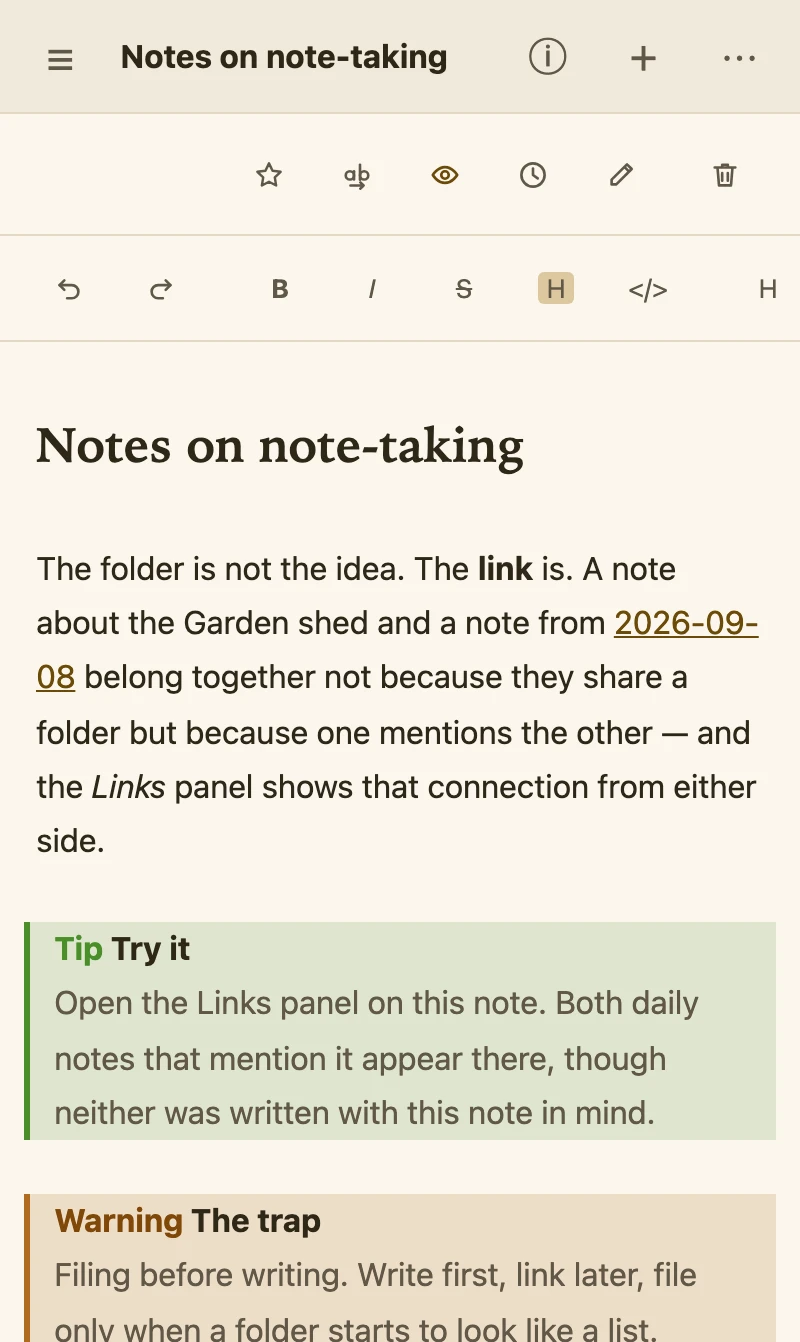
Vellen on an iPhone in light mode: a note with a heading, a link and a tip callout.
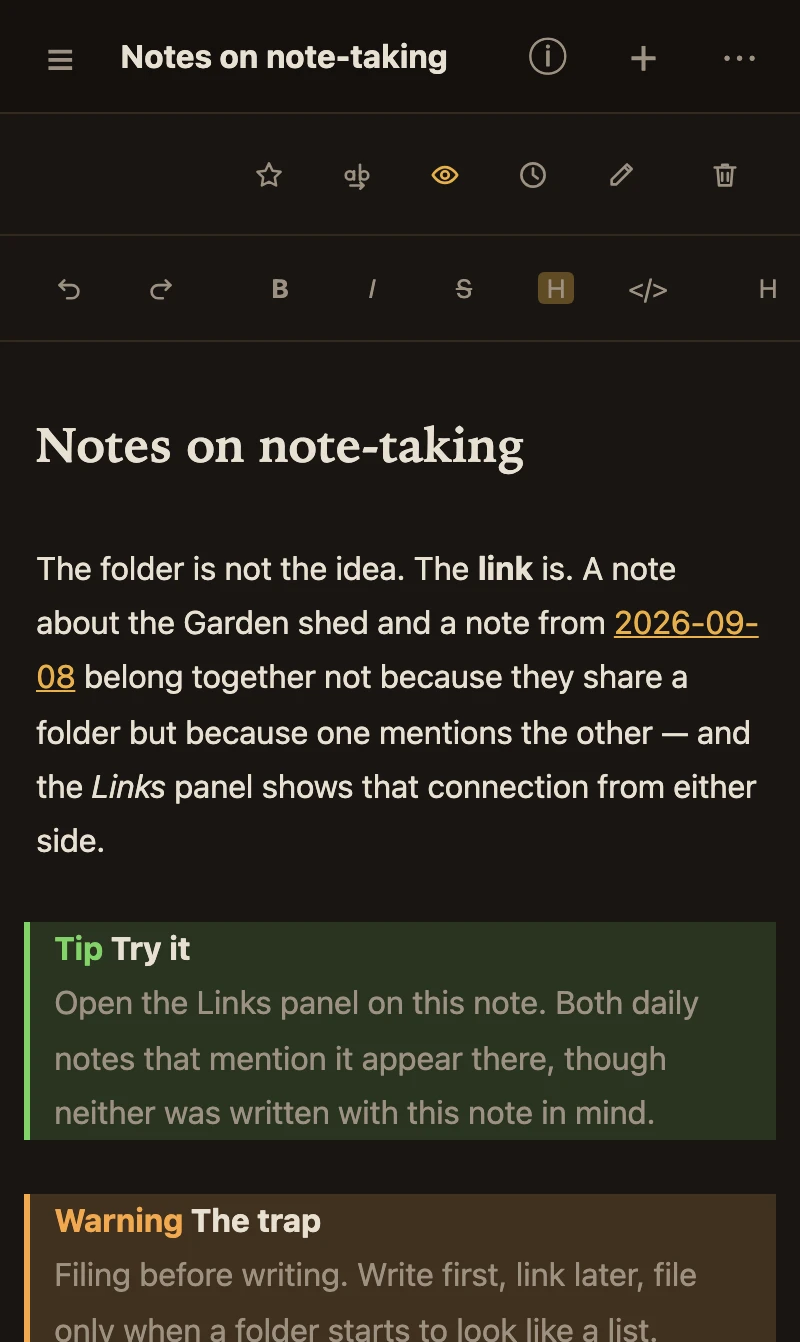
The same note on an iPhone in dark mode.

What works where

The same files everywhere, but not every screen is a desk. Here is exactly what each device can do today, so nothing is a surprise.

FeatureMac & WindowsiPadiPhone
Writing, links, graph, search, tags & propertiesLive Markdown, backlinks, tables, diagrams, maths, callouts✓✓✓
Sync & end-to-end encryption✓✓✓
Boards & tablesKanban and table views of a folder✓✓drag cards by finger, trackpad or mouse✓Boards: hold a card and drag it to another column, or ⋯ → Move to. Tables: read-only, tap a row to open its note.
WhiteboardsMind-map keys, folding, tidy, outline in and out✓✓touch gestures; branch buttons instead of keys; no multi-select✓touch gestures; branch buttons instead of keys; no multi-select
Tasks dashboard✓✓✓
Reminders at a task's timeeven with Vellen closed; Mark done and Snooze on the reminder✓Windows: the Microsoft Store version✓✓
Calendar✓month, week and day; drag to a day or an hour✓month, week and day; drag to a day or an hourList of days, and Daytap to open; no drag
Add to Calendara task sent to your calendar app as a copy✓✓✓
Your calendar's events beside your tasksread-only, in Week and DayMacnot on Windows yet✓✓
Tabs & split view✓✓—one note at a time
Version history, trash, smart folders✓✓✓
Daily notes & templates✓✓✓
AI with a cloud providerweb search with Anthropic✓✓✓
AI with a local model✓runs on the computerVia your computerpoints at a model on your home networkVia your computerpoints at a model on your home network
Capture a web page in the app✓✓✓
Browser clipperChrome, Edge, Brave✓——
Import from other appsEvernote, Notion, OneNote, Google Keep; Apple Notes in a coming update✓—import on the computer; sync brings it over—
Export & publishPDF, share as a web page, publish a folder as a website✓——
Keyboard shortcuts & command palette✓✓With a keyboard: the common shortcuts (⌘N, ⌘P, ⌘W…); every command is also under All commands on the icon strip—every command is in the ⋯ menu
Quick capture from any appa system-wide shortcut that opens a capture box✓——

Android phones follow the iPhone column and Android tablets the iPad column once it ships. Anything marked — is on the list, not off the table.

Pricing

Try it for two weeks. Then buy it once.

Every feature is on from the first minute — sync, encryption, boards, whiteboards, AI. If Vellen isn't for you, your notes are still just files in a folder; nothing to export, nothing to cancel.

Prices are per store, so the App Store purchase covers iPhone, iPad and Mac together, and the Microsoft Store purchase covers Windows. Each is a one-time payment. No subscription, ever.

Full-feature trial, then

$39.99one time
  • 14 days free, every feature — the App Store shows a $0.00 sheet to register the trial; nothing is charged
  • One purchase for iPhone, iPad and Mac
  • Every 1.x update included — no subscription, nothing recurring
  • Your notes stay yours whether you buy or not
Get Vellen

On Windows the Microsoft Store runs a 15-day trial of its own; same idea, one day longer.

Questions

The ones people ask first

Can I use the notes I already have?

If they're Markdown files, yes — point Vellen at the folder and they're your vault, links and all. Most notes apps can export to Markdown; once yours has, you're done. Coming from Evernote, Notion, OneNote or Google Keep? Import them on a Mac or Windows PC (Settings → Import & capture), and sync brings them to your phone.

Will it remind me about my tasks?

Yes. Give a task a day and a time, or just a day, and Vellen reminds you when it comes, even with the app closed. Each device sets its own reminders with its own notifications, so there is no server in the middle and nothing to sign up for. Turn them on in Settings → Reminders on each device you want reminded on.

Do I have to use sync?

No. Vellen is complete on one device. Sync exists for people with a Mac and a phone, and it goes through your own Google Drive, never through us.

What happens to my notes if I stop using Vellen?

Nothing. They're Markdown files in a folder you chose. Whiteboards are JSON files beside them. Open them in any editor or in another app that reads Markdown.

Is there a subscription?

No. One purchase, per store, and every update to that version is included — nothing recurring, ever. If a future major version (a 2.0) ever carries an upgrade price, it will be a one-time purchase too, and your current version keeps working exactly as it is. The trial is the full app for two weeks.

Does the AI see my notes?

Only the provider you chose, only when you ask, and only the notes involved in the question. Vellen has no service in the middle. Use a local model and nothing leaves your computer — or, from a phone or tablet, your own network.

Where do I go when I'm stuck?

Help is built in, and it's thorough — every feature, every shortcut, written for the device you're holding. If you've set up AI, you can simply ask it: "how do I add a property?" gets an answer drawn from that Help, not a guess. And there's a person at admin@capitalcalcs.com.

What does "end-to-end encrypted" mean here?

Your notes are sealed on your device with a passphrase only you know, before they upload to your Drive. Google stores files whose contents it can't read. Note and folder names, sizes and dates stay visible, so you can still find your notes in Drive; Help lists exactly what isn't hidden. The copies on your own devices stay plain, so forgetting the passphrase costs you nothing locally — you get a recovery phrase too, and any device that still has your notes can rebuild the Drive copy. Nobody can open the sealed copy for you, including us. That's the point.

Notes that connect. Yours, in a folder you choose, forever.

Vellen is made by a small company that keeps its own notes in it.